How To Use the HubSpot Prospects Tool to Generate New Leads
Most blog readers will never fill in a form, and most inbound marketers leave that traffic to evaporate. HubSpot's Prospects tool quietly shows you which company domains are visiting, even when nobody downloads anything. Here's the exact process for turning that raw "interest" signal into named leads, including filters, alerts, content scoring and the LinkedIn lookup that closes the loop.

On this page
As an inbound marketer there is nothing quite as frustrating as creating great content, that is read by potential customers, but on which they don’t act: no download, no contact form, nothing.
This is an unfortunate fact of life as the large proportion of readers will not take action on any specific blog post.
However, there is a nice HubSpot CRM Prospects feature that can help you turn even those non-downloaders into leads. Here’s the process we use.
Not everything HubSpot does is perfect and their naming of the Prospects tool is one of those imperfect items I’d like them to change. You see, Prospects isn’t really a list of Prospects, per se, it’s a list of company domains that have visited your site.
Not Leads yet, but you know it’s a goldmine just waiting to be tapped. So many companies who need what you sell, but have not filled out a form. So much possibility!
But how? How exactly can you do to turn this raw “interest” data into new leads?
In this post I’ll share our exact process to do just that.
Incidentally, this is a task where a solid process can really drive value for your business. Properly designed, it can be run by business development or inside sales people in your organisation who only call in a direct sales person when the time is right.
It also means you can “process” each prospect once and the system will let you know when you need to act. You don’t have to review and re-review each item on the list each day.
Here’s our actual process flow.
Head over to the HubSpot Prospects List
You’ll find Prospects under the Sales Tools / Prospect menu item.
Set up your Filters
Very few organisations will have the whole world as their marketplace.
If you, like us, are targeting a certain part of the world, use the filter settings to only show people coming to the site from countries that are valid for your business.
We filter on Australia and New Zealand.
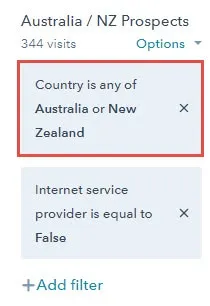
This means you can miss people arriving from corporate VPN networks, i.e. the branch office in Australia connects to the internet via their US head office. This will look to HubSpot like someone in the US and so will be filtered out.
To me, this is an acceptable loss for the benefit of removing the large number of red-herrings in the list.
There are other filters which use HubSpot collected company data on revenue, employees, etc. To be frank, I don’t 100% trust the reported company data and so we don’t filter on this information.
Set up Alerts
The Prospects tool can alert your sales team of new Prospects that have arrived at your site.
Make sure you set up these alerts, if only as a way to remind you to run the process each day.
Here is the HubSpot help page on this topic: Prospect Alerts
Review and Hide Non-Target Customers
Not every Prospect the list is one that you want to target. Using the Hide button is a great way to remove them from view so you can focus on the key opportunities.
In our case we typically remove Universities, Government departments, competitors and companies that are too big or too small for our services.
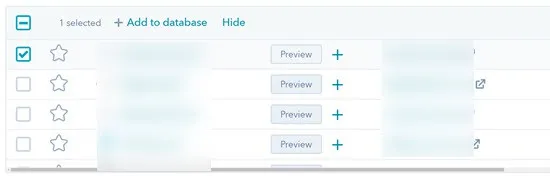
Just remember if you hide Prospects and want to find them again you’ll need to manually Export the data. So take care when hitting that Hide button. Not impossible to get to, just annoying.
Find Prospects With Lots of Activity
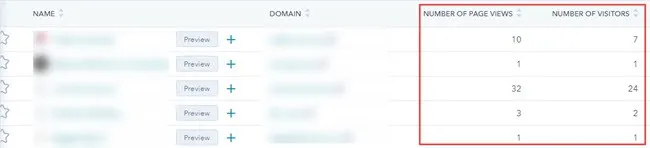
Great Prospects for this process have multiple page views and, even better, multiple people in the organisation browsing the data.
Make sure that you use the Customize button to add the following columns to the Prospects page:
- Number of Page Views; and
- Number of Visitors
With those two values you can see which companies are coming back time and again to view broad sections of your site.
You can even add a new filter to only show Prospects where the number of Page Views is greater than, say, one, so you ignore the fly-by visitors without a deep interest.
Check What They Have Viewed
By using the Preview button you can see which pages visitors have viewed. This can help you further narrow down the list of target opportunities.
Look for prospects that have viewed high value portions of your website: contact us, key product or service pages, etc.
Use LinkedIn to Find the Right Person.
Now you have a target company that might have a pressing problem with which you can assist. It’s time to find the right person and start a conversation.
Using LinkedIn searches and the company name, find a person or persons in the company that match your target Customer Persona and add them to the HubSpot CRM.
Use a Sequence To Reach Out
HubSpot Sequences are a great way to lightly automate some of the sales outreach process. They can be also be used to build best practice sales templates and approaches that can be reused by everyone in the business.
Perhaps the best feature of Sequences is that HubSpot drops the automation as soon as the person replies. This puts the sales person back in the driver’s seat at the first sign of engagement.
Using a Sequence in this way is very powerful as you can schedule a set of follow-ups and actions. The system will automatically send emails for you and alert you when you need to take a specific action: try to connect on LinkedIn, try to call.
We’ve found that your first email in the sequence can be quite frank. In it you should directly reference the fact that people from the contact’s company have been viewing content on your site.
Pro Tip: Make sure you include a direct link to your Meeting booking system so your prospect book a time to speak with you easily.
Move on to the next Prospect
With the Sequence started you can confidently move onto the next Prospect, knowing that the light touch automation will alert you when you Prospect engages with your email or when you need to take an action.
Using this approach you can build out a repeatable process to connect with higher probability leads.
Check out my post on how the free versions of HubSpot measures up against Zoho.